AI Video Cost per Usable Second: A Practical Method
Calculate the real cost of AI video generation per usable second. Count credits, retries and rejected clips, then compare tools by accepted footage.

The essentials
- Cost per usable second divides all relevant generation spend by the seconds that pass acceptance criteria written before rendering.
- Credits from different providers are not comparable units, and a cheap attempt can become expensive after repeated rejected takes.
- Track cost, acceptance rate and finishing time separately so one convenient average does not hide the real bottleneck.
On this page
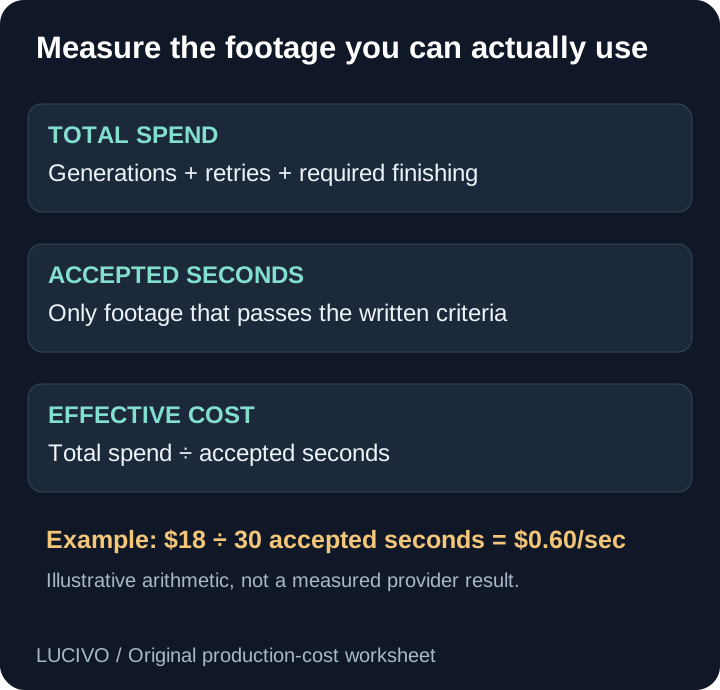
AI video cost per usable second is the total relevant generation spend divided by the seconds of footage that passed your acceptance criteria. It turns AI video generation cost, credits and retries into one outcome-based measure. It counts rejected takes, which ordinary price-per-generation comparisons leave out.
The formula is simple:
cost per usable second = included production spend ÷ accepted seconds
The difficult part is defining “included” and “accepted” consistently. Decide both before comparing tools. Otherwise a favored platform can receive generous exclusions while another is charged for every failed attempt.
Generated seconds and usable seconds are different
A provider bills a submitted generation according to its own model, duration, resolution and plan rules. That produces generated footage. Your editor may reject it because the subject changes, motion ignores the direction, text breaks, the crop is wrong or continuity fails.
Usable footage is the part that passes the requirements of the intended deliverable. A clip can be visually attractive and still be unusable for a product shot if the product geometry changes.
This distinction is especially important in credit-based products. The Higgsfield pricing guide explains its current plan and credit concepts, while this article provides a vendor-neutral measurement you can apply to Higgsfield, Runway, Veo, Sora, Kling or another workflow.
Write acceptance criteria before generating
Create a short checklist for each shot. A product clip might require:
- Correct subject and product shape throughout.
- Requested camera direction with no unexpected cut.
- No invented text, logo or object.
- At least four continuous seconds suitable for the edit.
- Correct aspect ratio and minimum resolution.
- No artifact that remains obvious at delivery size.
Freeze the criteria before viewing results. If the standard changes after every output, acceptance rate becomes a mood rather than a metric.
Different projects need different thresholds. A background texture may tolerate small inconsistencies. A client product shot cannot tolerate a changed label. Publish the criteria beside any comparison so readers understand what “usable” meant.
Separate every AI video pricing unit
AI video pricing pages commonly use one of four units: credits per generation, credits per generated second, cash per generated second or a monthly credit allowance. None directly states what an accepted shot will cost.
Normalize the units in stages:
credits used × cash value per credit = attempt spend
all attempt spend ÷ generated seconds = cost per generated second
all attempt spend ÷ accepted seconds = cost per usable second
The middle figure helps compare billing. The last figure helps budget a deliverable. Keep both because a provider can have a low generated-second price and a high project cost when the workflow needs many retries.
If a subscription does not assign a stable cash value to each credit, state the allocation method rather than inventing one. Record separate rates for resolution, duration, audio generation, upscaling and premium models when the provider bills them differently.
Record every attempt in a render ledger
Use one row per generation, including failures:
| Field | Example entry |
|---|---|
| Shot ID | product-01 |
| Provider and model | exact model identifier |
| Mode | image-to-video |
| Duration and resolution | 5 seconds, 720p |
| Attempt | 3 |
| Credits or API charge | current quoted amount |
| Accepted seconds | 0 or retained duration |
| Failure reason | product shape changed |
| Finishing minutes | time required after generation |
The failure reason turns cost tracking into workflow improvement. If most rejects come from camera conflicts, revise the shot brief. If labels repeatedly deform, remove precision text from generation and add it during editing.
Our Higgsfield prompt examples separate subject movement from camera movement for exactly this reason. A clearer prompt does not guarantee success, but it can make failures easier to diagnose.
Convert credits into actual spend
Credits are internal accounting units. One platform's credit does not equal another platform's credit. Even within one platform, different models and settings may consume different amounts.
For a subscription, use a documented allocation method:
allocated generation spend
= subscription amount × share of included credits used by the measured project
State what you did with unused credits. If you bought a $30 plan only for one project and the remaining credits expired unused, the project effectively carried the whole $30. If the subscription also supported other projects, allocate the amount consistently rather than charging each project the full plan.
For an API with a per-second rate, multiply the applicable rate by every generated second, not only accepted output. Google's official Gemini API pricing lists Veo rates by model and resolution. Those rates can change, so store the source URL and verification date with the ledger.
Do not mix advertised monthly equivalents with month-to-month prices. Record taxes and required add-ons when they materially affect the decision.
A worked example
Suppose a five-shot sequence needs 30 accepted seconds. The team generates 18 clips and spends $18 under the chosen measurement boundary. Six clips contribute a combined 30 accepted seconds.
$18 total generation spend ÷ 30 accepted seconds
= $0.60 per usable second
The acceptance rate by clip is:
6 accepted clips ÷ 18 generated clips = 33.3%
These are invented round numbers explaining the calculation. They are not a claim about any model's success rate.
If the same project produces 90 generated seconds, dividing $18 by 90 would report $0.20 per generated second. That figure is correct for billed output but misleading for the finished edit. Both numbers can be reported as long as they are labeled.
Track three metrics instead of one
Cost per usable second is valuable but incomplete. Track:
- First-pass acceptance rate: How often the first attempt succeeds.
- Cost per usable second: How much generation spend produced accepted footage.
- Minutes to accepted shot: How much review, prompting and finishing work was required.
A lower generation cost can lose its advantage if every accepted shot requires extensive repair. Keep labor time separate unless you have a documented hourly cost. This prevents a guessed labor value from making the calculation appear more precise than it is.
Queue time also matters for urgent work. Record it as an operational metric rather than silently converting every minute into money.
Compare providers with the same brief
Use the same reference asset, output ratio, duration target and acceptance criteria. Set an equal spending cap or attempt limit. Save every result, not only the best showcase clip.
The Higgsfield vs Runway comparison includes a three-shot test method. Extend it with the ledger here to compare outcome cost.
Avoid these invalid comparisons:
- A premium model at 1080p against a fast model at 720p without labeling the difference.
- Text-to-video on one platform against a reference-controlled workflow on another.
- Subscription credits on one side and list API pricing on the other without allocation rules.
- A simple landscape on one side and a strict branded product on the other.
- One selected winner against the competitor's first attempt.
The metric belongs to the recipe and task, not permanently to the platform. “Model A costs $0.40 per usable second for our defined product test” is defensible. “Model A always costs $0.40 per usable second” is not.
Handle zero accepted output correctly
If no seconds pass the criteria, the denominator is zero. The cost per usable second is undefined—not zero.
Report:
Spend: $12
Accepted seconds: 0
Cost per usable second: undefined
Outcome: no acceptable output within the test cap
That result is decision-useful. It says the workflow failed within the agreed boundary. Hiding it by averaging only successful projects creates selection bias.
Decide what finishing work belongs in the measure
Generation spend alone is the cleanest cross-platform starting point. Create a second “finished asset” measure if the project also requires upscaling, lip sync, audio, compositing or paid editing tools.
Define the boundary:
| Measure | Include |
|---|---|
| Generation cost | All generation and retry charges |
| Accepted-shot cost | Generation plus required generation-stage transformations |
| Finished-asset cost | Accepted-shot cost plus required paid finishing operations |
Keep human editing time as its own column unless your team has an established costing method. This lets readers recombine the numbers for their own situation.
Use the ledger to reduce waste
Group rejected attempts by cause. Common categories include subject identity, geometry, camera motion, continuity, text, framing, unwanted scene change and technical export failure.
Then change one variable at a time. Improve the reference, simplify the movement, select a more suitable model or move exact text to post-production. If a workflow repeatedly fails the same acceptance rule, stop spending against the same setup.
For a first controlled experiment, follow the Higgsfield image-to-video tutorial. Its simple single-shot brief is intentionally easy to score.
Publish comparisons readers can reproduce
Include the source date, model identifier, settings, acceptance rules, number of attempts, total spend and accepted duration. Link official pricing rather than copying an unmaintained number without context.
Update the article when provider rates or model access change, but preserve older dated results. A historical result should stay attached to the price and model used at the time.
Cost per usable second will not tell you which video looks best. It answers a narrower and more useful planning question: given a defined quality bar, how much did this workflow charge to produce footage you could actually keep?
Common Questions & Practical Answers
How do I calculate AI video cost per usable second?
Add the generation and retry spend included in your measurement, then divide it by the seconds of footage that passed your written acceptance criteria.
Should failed AI video generations count in the cost?
Yes, when they were part of producing the accepted result. Excluding rejected takes understates the project cost.
Can I compare AI video credits across platforms?
Not directly. Credit values, model rates, duration, resolution, audio and subscription rules differ. Convert each workflow to actual spend for the same deliverable.
How much does AI video generation cost per second?
There is no universal rate. Providers price different models, durations, resolutions and audio options differently. A listed generated-second rate also excludes retries, so calculate usable-second cost for the deliverable you accepted.
Practical guides published by Lucivo, developed with AI assistance and references to official documentation. Examples are illustrative unless a guide explicitly documents a hands-on test. Check the linked sources for current product details.
Related articles

How to Verify AI Images with C2PA Content Credentials

Higgsfield Prompts: 8 Camera Moves with Clear Examples

How to Use Higgsfield AI: Your First Image-to-Video Clip
The Weekly Breakdown
High signal AI & software stories.
Direct to your inbox. No hype.
Independent analysis of AI models, developer tools, and computing architectures. Delivered every Sunday morning. 100% free.