How to Verify AI Images with C2PA Content Credentials
Verify AI images with C2PA Content Credentials. Check image provenance, signatures and edit history, and learn what missing metadata cannot prove.
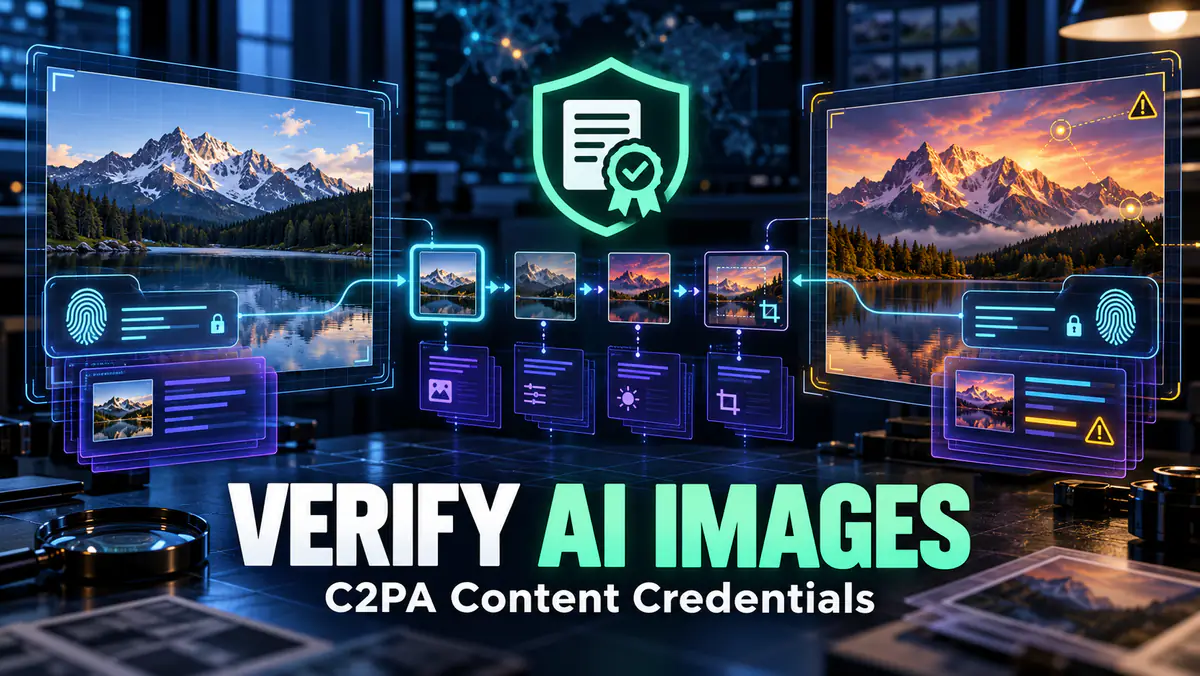
The essentials
- C2PA Content Credentials can provide signed provenance about an asset’s origin and edits; they do not determine whether the depicted event is true.
- No manifest found is an unknown result, not proof that an image is authentic or AI-generated.
- Preserve the original file and record the verifier, result and time because screenshots and conversions can remove provenance data.
On this page
To verify an AI image with C2PA Content Credentials, obtain the original file, inspect its C2PA metadata with a compatible verifier, check the signer and recorded actions, and distinguish a valid provenance record from proof that the image’s subject is true. Missing credentials leave the origin unknown; they do not classify the file as real or fake.
C2PA is a technical standard for attaching cryptographically verifiable provenance information to digital media. “Content Credentials” is the user-facing term commonly used for implementations of that standard. The current C2PA specifications describe how signed claims, assertions and asset bindings are stored and validated.
This is a provenance workflow, not a replacement for reporting, source verification or visual investigation.
What Content Credentials can tell you
Depending on the creator, tool and implementation, a credential may identify:
- The application, service or device that signed the asset.
- When a signed step occurred.
- Actions declared during creation or editing.
- Ingredients used to create a derived asset.
- Whether the file still matches the cryptographic binding in the manifest.
- Whether the signer can be evaluated through the verifier's trust model.
It may also disclose that generative AI was used when the signing product records that information. The exact fields vary. Do not assume every credential includes a prompt, person’s identity or complete edit history.
OpenAI's content-provenance documentation explains that verification results can include C2PA and SynthID signals and warns that cropping, screenshots, compression or metadata removal can weaken or erase signals. Other vendors may implement different combinations.
What Content Credentials cannot prove
A valid credential does not prove that the depicted event happened. A camera can photograph a staged scene. An authenticated editor can create a misleading composite. A signer can make a technically valid claim that still requires you to decide whether the signer is trustworthy.
C2PA also does not guarantee that every earlier step is recorded. Provenance begins where the available signed chain begins. If an unsourced image becomes an ingredient in a newly signed composition, the signature can establish the later action without proving the unknown ingredient’s origin.
Treat these as separate questions:
| Question | Can C2PA answer it? |
|---|---|
| Does this file match its signed manifest? | Often, when a supported manifest is present |
| Which product signed the claim? | Often, subject to available trust information |
| Were declared edits recorded? | It can show declared actions in the signed chain |
| Did the depicted event really happen? | No |
| Is an unsigned image authentic? | No conclusion |
| Was all AI use disclosed? | Only what the available provenance records establish |
How a C2PA manifest is organized
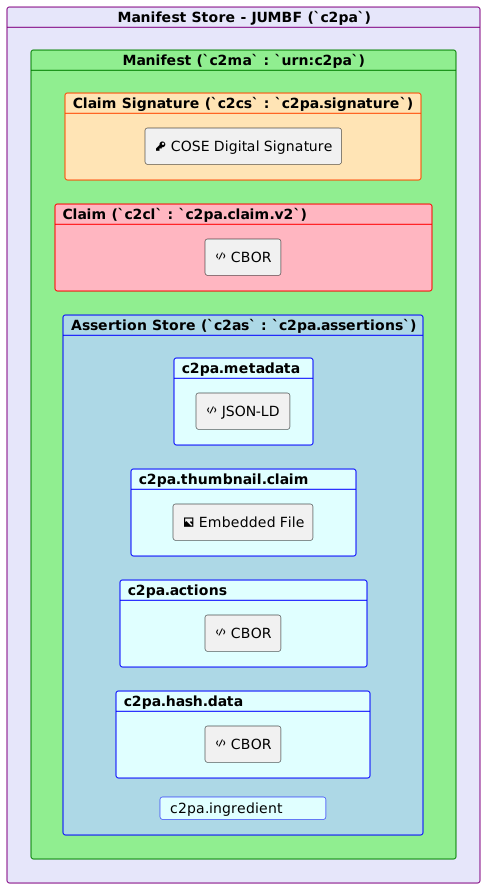

The diagram shows three concepts useful to a verifier:
- The claim signature signs the claim.
- The claim identifies what is asserted and how the asset is bound.
- The assertions carry information such as actions, metadata and ingredients.
You do not need to decode CBOR or JUMBF manually for an ordinary check. A verifier presents these structures in readable form. Understanding the layers helps explain why “signature valid” and “every statement is true” are not the same conclusion.
Step 1: obtain the best available file
Download the original asset from the publisher or ask the sender for the original file. Do not begin with a screenshot from a messaging app if the original is available.
Preserve the file unchanged. Record its filename, source URL, download time and, for a serious investigation, a cryptographic hash. Work on a copy.
Social platforms can resize, recompress or re-encode images. A screenshot creates a new image of the screen rather than preserving the embedded manifest from the displayed file. If the screenshot has no credentials, that says nothing about whether the original had them.
Step 2: use a compatible verifier
Open the official Content Credentials Verify tool or another verifier whose handling and privacy policy you understand. Add the file and wait for its result.
Before uploading confidential media, check whether the verifier processes the file locally or sends it to a server. Provenance verification can itself disclose an unpublished asset if the service uploads it.
Record the verifier name and date because validation software and trust lists change. For repeatable technical work, the open-source C2PA Tool can inspect supported files from the command line.
Some providers also operate their own provenance checks. OpenAI Verify checks supported provenance signals associated with OpenAI content, while the OpenAI documentation states that a result with no detected signal does not rule out generation by another company’s model. Treat a vendor checker as evidence about that vendor’s supported signals, not as a universal AI image detector.
Step 3: classify the result
Use three broad states:
Valid credential found
The verifier found a manifest, validated the asset binding and accepted the signature under its rules. Inspect the signer, tool, timestamps, actions and ingredients. Then ask whether you trust the identified signer and whether the record covers the history relevant to your question.
Credential found with a warning or invalid state
The file may have changed after signing, the manifest may be incomplete, the signing certificate may not be trusted by the verifier or another validation rule may have failed. Read the exact error. Do not reduce every warning to “fake.”
Compare with the original source file. A benign platform conversion and malicious alteration can both disturb a binding; the verifier detects a technical condition, not the editor’s intent.
No manifest found
The file has no detectable supported manifest. Report the result as provenance unavailable. Possible explanations include:
- The creator or device never added credentials.
- The format or verifier does not support the record.
- A platform stripped metadata.
- The asset was cropped, converted or captured as a screenshot.
- Someone intentionally removed the manifest.
These explanations lead to opposite stories, so absence alone cannot choose between them.
Step 4: inspect the signer and actions
Look for the claim generator or signing product. A recognizable name is not enough; check whether the verifier establishes a trusted signing chain and whether the product appears in the relevant C2PA conformance information.
Review the actions in order. They may describe creation, editing or ingredient use. Ask:
- Does the chain start with capture, generation or an unknown ingredient?
- Is generative AI use declared?
- Are crops, composites or other edits recorded?
- Is there an ingredient you need to inspect separately?
- Does the timeline make sense with the publication claim?
Do not infer that an unlisted action definitely did not happen outside the recorded chain.
Step 5: verify the story around the image
Provenance is one evidence layer. Continue with ordinary verification:
- Find the earliest publication you can establish.
- Contact the claimed creator or publisher when stakes justify it.
- Compare landmarks, weather, shadows and known event details.
- Run reverse-image searches for earlier appearances.
- Inspect related frames or original sequences.
- Check whether reputable sources independently document the event.
The AI hallucination checklist applies the same principle to generated claims: inspect original evidence rather than trusting confident presentation.
Do not rely on visual AI detectors alone
An AI detector estimates patterns. It can produce false positives and false negatives, and its score may shift after compression or editing. C2PA uses signed provenance rather than guessing only from pixels, but it works only when credentials exist and survive.
Use the two methods for different questions:
| Method | Stronger question |
|---|---|
| Content Credentials | What signed provenance is attached to this file? |
| Pixel-based detector | Does this image resemble examples the detector classifies as synthetic? |
| Source investigation | Who published it, when and with what corroboration? |
No single row establishes the complete truth.
Preserve provenance in your own workflow
If your creation tool supports Content Credentials, enable them and keep the original signed output. Use compatible editors when you want later changes recorded in the chain. Avoid stripping metadata during export without understanding the consequence.
When publishing generated visuals, add a clear human-readable disclosure near the image even when technical credentials exist. Readers should not need specialist software to learn that an illustration is synthetic.
This matters for AI video and image workflows such as Higgsfield. A generated asset can be useful editorial illustration while still needing accurate labeling, source notes and rights checks.
A responsible verification note
Use wording that matches the evidence:
The original file contained a C2PA manifest that the named verifier reported as valid on October 5, 2026. The manifest identified the signing product and recorded the listed actions. This verifies the available signed provenance; it does not independently prove the depicted event occurred.
Or, when nothing is found:
No supported C2PA manifest was detected in the available file. The image’s provenance remains unknown; the result does not establish whether it is authentic or AI-generated.
Precise language is the most important part of the process. A verification tool gives you technical evidence. Your conclusion should never claim more than that evidence supports.
Common Questions & Practical Answers
Can C2PA prove that an image is real?
No. It can verify signed provenance claims and whether a signed asset matches those claims. It does not independently prove that the depicted event happened or that every statement in the credential is trustworthy.
Does missing Content Credentials mean an image is fake?
No. The creator may not have used C2PA, or a platform, screenshot, crop or format conversion may have removed the manifest.
Can editing an image invalidate its Content Credentials?
Unrecorded changes can break the binding to a signed asset, while compatible tools can add a new signed step that preserves an edit history. The verifier result must be interpreted in context.
How do I check whether an image has Content Credentials?
Obtain the original file and open it in a C2PA-compatible verifier. Check whether a manifest is present, whether its signature validates, who signed it and which creation or editing actions it records.
Practical guides published by Lucivo, developed with AI assistance and references to official documentation. Examples are illustrative unless a guide explicitly documents a hands-on test. Check the linked sources for current product details.
Related articles

AI Video Cost per Usable Second: A Practical Method

Higgsfield Prompts: 8 Camera Moves with Clear Examples

How to Use Higgsfield AI: Your First Image-to-Video Clip
The Weekly Breakdown
High signal AI & software stories.
Direct to your inbox. No hype.
Independent analysis of AI models, developer tools, and computing architectures. Delivered every Sunday morning. 100% free.