MCP Invalid JSON: Check Your stdout Logs
Find startup banners and debug logs contaminating MCP stdio messages, then separate protocol output from diagnostics safely.
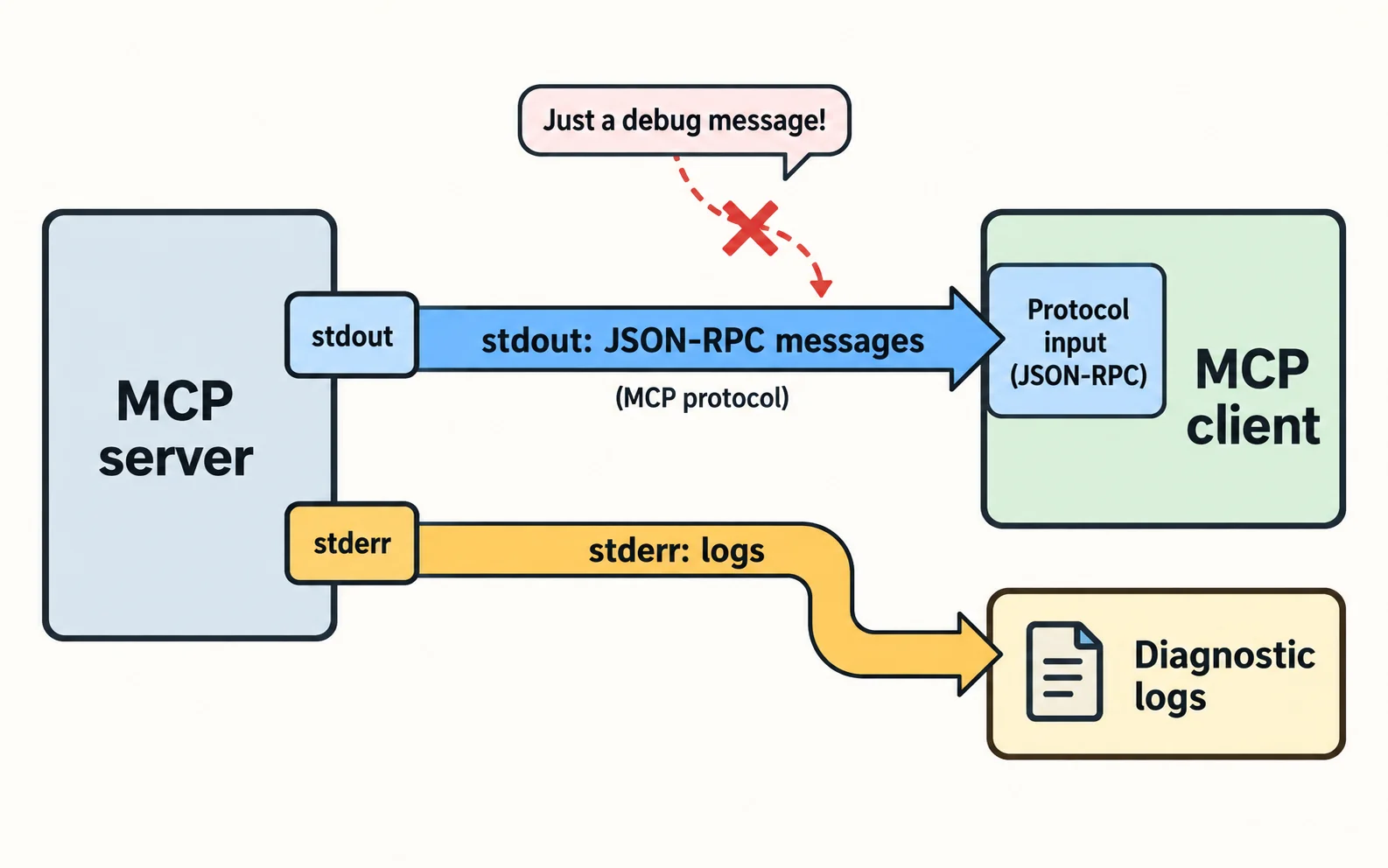
The essentials
- For an MCP server using stdio, ordinary logging to standard output can corrupt the protocol stream.
- A startup banner or debug message may be read as a protocol message and fail JSON parsing.
On this page
For an MCP server using stdio, ordinary logging to standard output can corrupt the protocol stream. A startup banner or debug message may be read as a protocol message and fail JSON parsing. Send diagnostics to standard error through the appropriate logging configuration.
Confirm the transport first
This diagnosis applies to stdio. An HTTP server can fail JSON parsing for other reasons, including an HTML error page returned by a proxy. Record which transport your client uses before applying a fix.
The MCP stdio transport description separates protocol messages on stdout from diagnostics on stderr. Match lifecycle details to the protocol revision supported by your implementation.
Find the first unexpected bytes
Capture startup output in a controlled development environment. Inspect the first unexpected line without dumping credentials or complete private tool payloads into shared logs.
Common candidates include a framework banner, a dependency's initialization message, a package runner prompt or a debug print in an imported module. Removing one print statement will not help if another library still writes a banner.
Build a small evidence record:
| Stage | Expected output | Observed extra text |
|---|---|---|
| Process launch | Protocol-compatible startup | Record |
| Tool discovery | Valid response | Record |
| Tool call | Valid response | Record |
| Shutdown | Clean process behavior | Record |
Move diagnostics deliberately
In Python, an illustrative diagnostic is print("starting server", file=sys.stderr). In Node.js, console.error("starting server") writes a diagnostic to stderr. Configure your logger similarly.
Do not redirect all stderr into stdout in the launch command. That recombines the channels and recreates the problem. Also do not suppress every diagnostic merely to make parsing succeed; you still need to investigate real failures.
Check whether a wrapper script, shell profile or package manager emits output before the server starts. Non-interactive process launch should not wait for a prompt that the client cannot answer.
Retest the complete lifecycle
Use the MCP Inspector to exercise discovery and one read-only call. Restart the process and repeat. Some contamination appears only on a cold launch or error path.
An empty stdout stream is not success if the server no longer sends protocol responses. Confirm that valid responses still arrive and diagnostics remain available.
Keep this distinct from tool errors
A valid protocol response describing a failed tool is different from an unreadable protocol stream. If JSON parsing succeeds and the tool returns an error, inspect the tool's inputs or downstream service instead.
For the wider model, read MCP explained. If tools still fail to appear after fixing the transport, continue with discovery and schema validation rather than broad permission changes.
Related troubleshooting
This guide draws on the linked documentation. Examples are illustrative unless explicitly identified as measured results.
Practical guides published by Lucivo, developed with AI assistance and references to official documentation. Examples are illustrative unless a guide explicitly documents a hands-on test. Check the linked sources for current product details.
Related articles
Stop Repeated AI Agent Tool Calls
AI Transcription Invents Words in Silence
Change Embedding Models Without Mixing Vectors
The Weekly Breakdown
High signal AI & software stories.
Direct to your inbox. No hype.
Independent analysis of AI models, developer tools, and computing architectures. Delivered every Sunday morning. 100% free.