Docker Cannot Reach an API on Your Laptop
Map container-to-host connections correctly and separate hostname, port and bind-address failures when an API works only on your laptop.
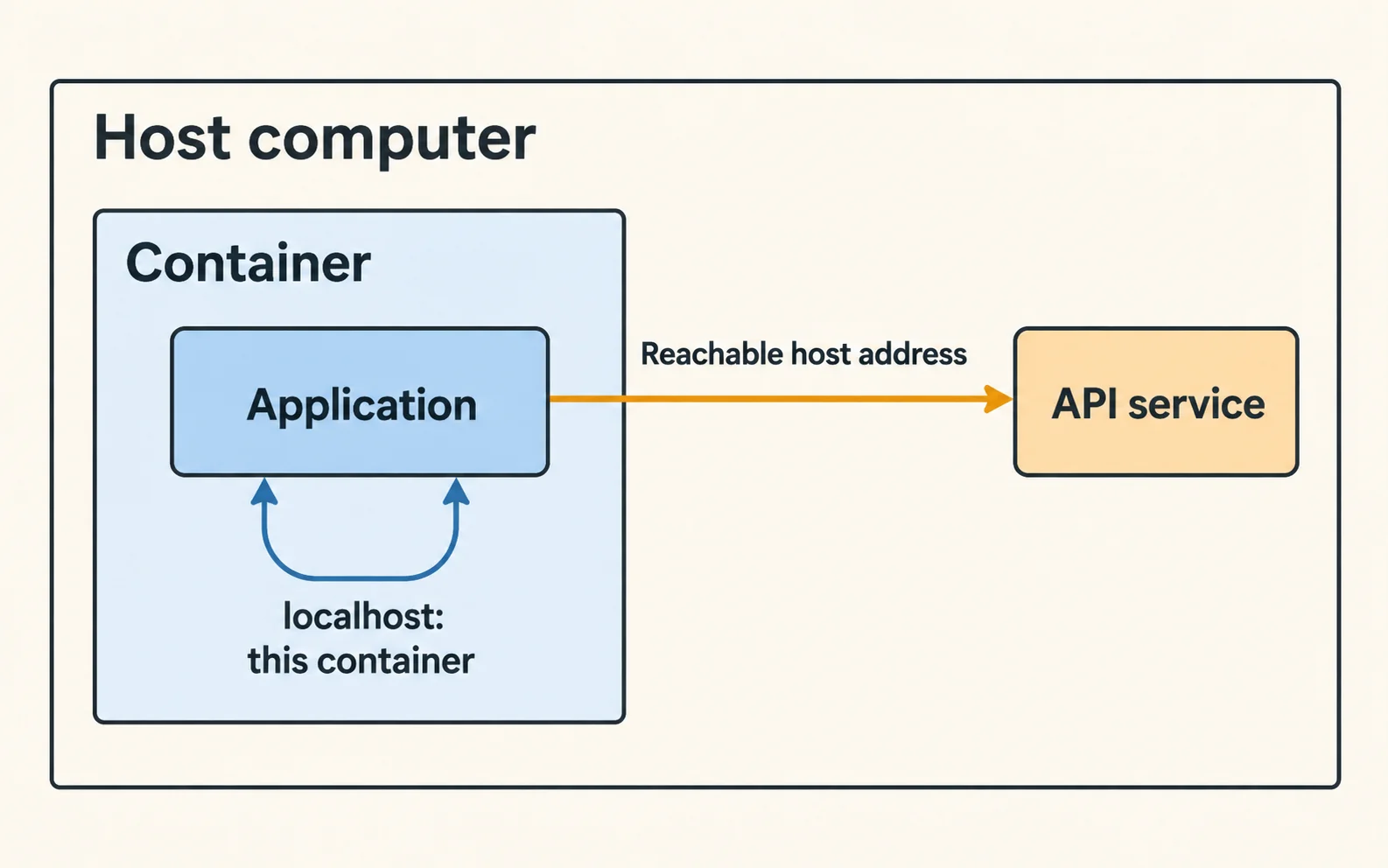
The essentials
- Inside a container, localhost normally refers to that container.
- It does not refer to your laptop or a neighboring service.
On this page
Inside a container, localhost normally refers to that container. It does not refer to your laptop or a neighboring service. Choose the address from the perspective of the process making the request, then verify that the target listens on an interface reachable from that process.
Draw the actual connection
Write the caller, destination and port before changing configuration. A browser on your laptop, a backend in a container and an API in another container may all need different addresses.
Docker's Compose networking guide explains service-name discovery on shared networks and host access. Container-to-container calls normally use the destination service name and its container port, not the host's published port.
For Docker Desktop, the host-access name commonly used is host.docker.internal. Linux Engine setups can require explicit host-gateway configuration. Do not assume identical behavior across installations.
Check the listening address
A host API bound only to 127.0.0.1 may not accept traffic arriving through the container's host gateway. Fixing the hostname alone will not make that listener reachable.
Inspect the intended API's bind configuration and firewall. If you broaden its listening address, restrict who can reach it. A local development fix should not unintentionally expose an unauthenticated model endpoint to the whole network.
Use a benign health endpoint where available. Avoid debugging by sending private prompts to a destination you have not identified.
Diagnose by symptom
| Result | Next check |
|---|---|
| Hostname does not resolve | DNS or host-gateway mapping |
| Connection refused | Listener, target port, address family |
| Connection times out | Routing, firewall, unreachable target |
| HTTP error arrives | Network path works; inspect application |
| Works from host only | Caller namespace and target bind address |
These symptoms narrow the investigation but are not exclusive proofs. A firewall can reject rather than silently drop traffic.
Compare equivalent requests
Send the same harmless request from the host and the calling container. Keep method, path and protocol identical. Confirm whether the application expects HTTP or HTTPS.
For an illustrative setup with a web UI in Docker and Ollama on the host, record both the configured base URL and the address Ollama listens on. Do not copy a URL from a tutorial without checking where each component runs.
Verify the normal workflow
Once the health request succeeds, test the actual application path and restart the containers. Confirm that the configuration survives recreation and that access remains limited to intended callers.
The local Ollama guide covers the model runtime. Use this network map whenever you put the interface, database or tool server in a different container.
Related troubleshooting
This guide draws on the linked documentation. Examples are illustrative unless explicitly identified as measured results.
Practical guides published by Lucivo, developed with AI assistance and references to official documentation. Examples are illustrative unless a guide explicitly documents a hands-on test. Check the linked sources for current product details.
Related articles
AI Streaming Arrives All at Once Behind NGINX
API Key Committed to Git: What to Do Next
API Timeout: Is It Safe to Retry?
The Weekly Breakdown
High signal AI & software stories.
Direct to your inbox. No hype.
Independent analysis of AI models, developer tools, and computing architectures. Delivered every Sunday morning. 100% free.